按照步骤进行,理论上日主题全系列都可以授权,只测试了ripro-v5子主题,其他子主题自行测试(可能需要修改一下代码)
1、Nginx配置文件添加伪静态规则
# 屏蔽RiTheme授权验证请求
location ~* (ritheme\.com|verify_license|check_update|auth\.php|license\.php) {
	access_log off;
	log_not_found off;
	return 444;
}

# 屏蔽主题的授权检查API端点
location ~* (wp-admin/admin-ajax\.php\?action=theme_ajax_activ) {
	access_log off;
	return 200 '{"success":true,"data":"授权验证成功"}';
}

# 屏蔽主题更新检查
location ~* (api\.wordpress\.org/themes/update-check) {
	access_log off;
	content_by_lua_block {
		ngx.header.content_type = 'application/json';
		ngx.say('{"themes":{}}');
	}
}
这个伪静态规则放到Nginx配置文件的server里面,或者单独放到网站的伪静态也可以
2、复制下面的全部代码粘贴到 functions.php 文件最底部
// 强制授权激活
add_action('admin_footer', 'fix_ritheme_license_activation_ui');
function fix_ritheme_license_activation_ui() {
if (isset($_GET['page']) && $_GET['page'] === 'ripro' && isset($_GET['tab']) && $_GET['tab'] === '主题授权') {
// 获取当前站点信息
$siteurl = get_option('siteurl');
$option_key = md5('riprov2_license_data'.$siteurl);
// 检查是否已授权
$is_activated = !empty(get_option($option_key));
// 如果未授权,自动填充并提交
if (!$is_activated) {
?>
jQuery(document).ready(function($) {
// 自动填充表单
$('#theme_lic_id').val('88888888');
$('#theme_lic_key').val('wukongymw.com');
// 创建弹窗容器
$('body').append(`
`);
// 自动提交表单
setTimeout(function() {
$('#theme_act_btn').click();
}, 1000);
// 监听授权按钮点击
$('#theme_act_btn').on('click', function() {
var btn = $(this);
var originalText = btn.text();
// 显示加载状态
btn.text('激活中...').prop('disabled', true);
// 发送AJAX请求
$.ajax({
url: ajaxurl,
type: 'POST',
data: {
action: 'theme_ajax_activ',
id: $('#theme_lic_id').val(),
key: $('#theme_lic_key').val()
},
success: function(response) {
if (response.success) {
// 显示成功弹窗
$('#license-success-modal').fadeIn();
// 5秒后自动刷新
setTimeout(function() {
location.reload();
}, 5000);
// 立即刷新按钮
$('#confirm-refresh').on('click', function() {
location.reload();
});
} else {
alert('激活失败: ' + response.data);
btn.text(originalText).prop('disabled', false);
}
},
error: function() {
alert('请求失败,请重试');
btn.text(originalText).prop('disabled', false);
}
});
});
});
jQuery(document).ready(function($) {
// 移除激活表单
$('.theme-license-warp').remove();
// 显示授权成功状态
$('.csf-field-callback').html(`
🎉 主题授权已激活
`);
});
$id, 'key' => $key]);
$data = openssl_encrypt($data, 'AES-256-CBC', $password, 0, '0123456789abcdef');
$data = base64_encode($data);
update_option($option_key, $data, true);
delete_transient($transient_key);
set_transient($transient_key, '1');
// 设置其他授权选项
update_option('riprov2_license_status', '1');
update_option('riprov2_license_key', $key);
update_option('riprov2_license_key_id', $id);
update_option('riprov2_license_key_status', 'valid');
update_option('riprov2_license_key_expire', date('Y-m-d', strtotime('+10 years')));
// 返回成功响应
wp_send_json_success('悟空源码网提醒您:激活成功!');
}
// 防止主题重置授权状态
add_filter('pre_set_site_transient_update_themes', function($transient) {
if (isset($transient->response['ripro-v5'])) {
unset($transient->response['ripro-v5']);
}
return $transient;
});
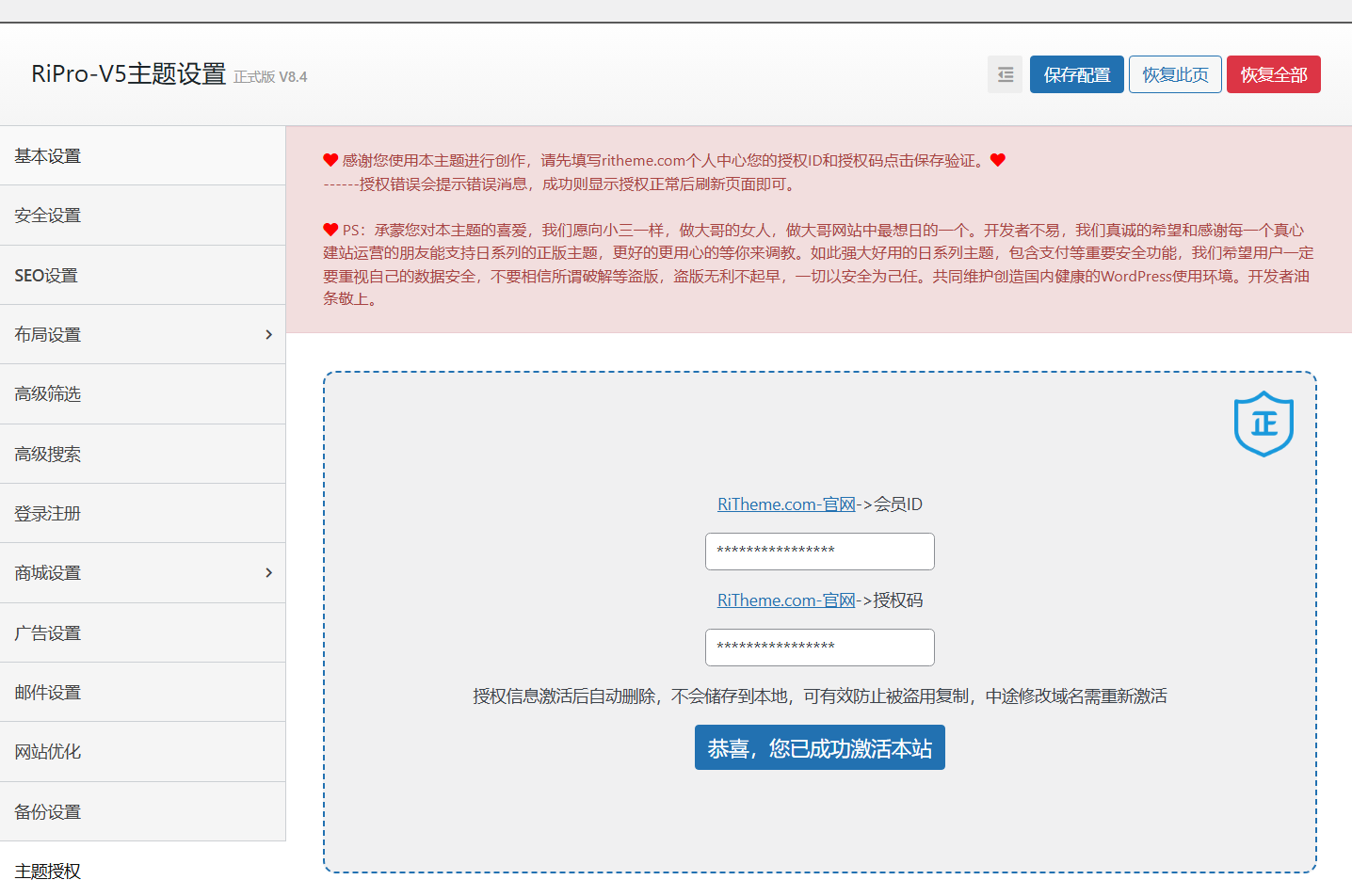
3、在后台授权页面输入id:88888888、key:wukongymw.com 点击授权,授权后手动刷新网页就可以了
如果授权后过一段时间还有提示,要么重复第三点步骤,要么直接修改hosts文件屏蔽授权服务器
4、修改hosts文件屏蔽授权服务器
# /etc/hosts 修改并重启服务器
127.0.0.1 ritheme.com
127.0.0.1 api.ritheme.com
127.0.0.1 license.ritheme.com
截图展示

 悟空源码网
悟空源码网 
留下评论